
Server & Client Architecture
Server & Client Architecture
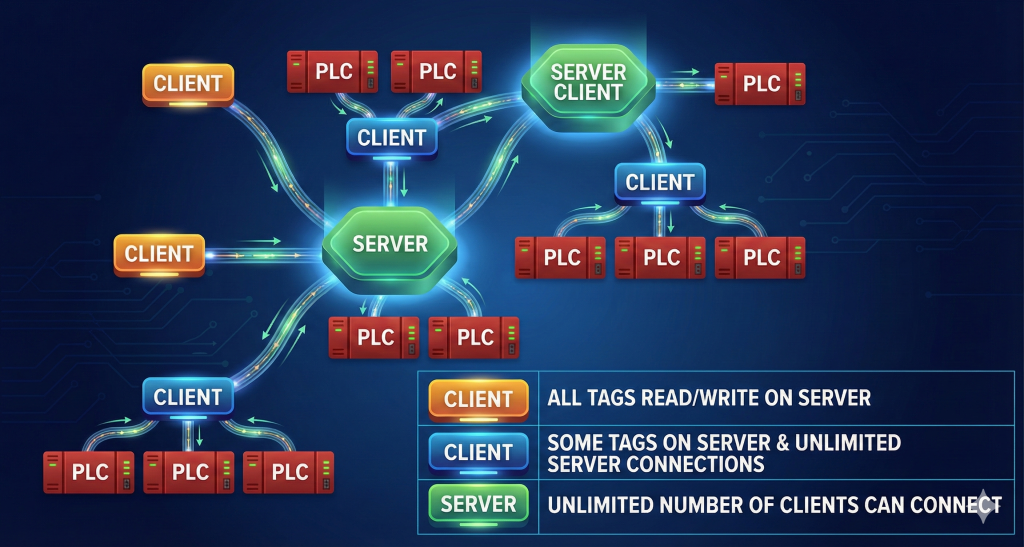
Thanks to its flexible structure, Wise SCADA can serve as both a data provider (Server) and a data collector (Client) in your projects. Before configuring your system, review the three basic operating modes below to determine the structure suitable for your project.
1. Operating Modes
Wise SCADA supports three different communication architectures:
A. Server Mode (Data Provider)
In this mode, SCADA collects data from PLCs and devices in the field and acts like a center (Hub).
- How to Activate: It is activated by defining a new server from the “Servers” tab and clicking “Activate Listener”.
- Function: It allows other SCADAs, 3rd party software, or mobile applications to connect to this project and read/write data.
- Restrictions: For security purposes, access permissions can be granted to specific IP addresses, or only specific Tags can be shared (Custom List).
B. Standard Client Mode (Partial Connection) This mode is a “Hybrid” structure. The SCADA project communicates with its own PLCs and also exchanges data with other Wise SCADA Servers on the network.
- How to Activate: It is created under the “Clients” tab by entering the information of the server to be connected.
- Data Structure: Not all data is fetched; only the needed Tag list is created manually.
- Redundancy: Multiple Server IPs can be defined. If the main IP is unreachable, the system automatically tries the backup IP. Once connected, it stays on that IP until the connection breaks.
- Communication Methods:
- GET (Read): Fetches periodic data from the Server.
- PUT (Write): Based on Trigger or value change. Time-independent. When a tag defined in SCADA changes, a “Set” command is sent to the Server.
- Dynamic: Instantly reads data from the Server depending on a trigger condition. Ensures exact matching.
C. Full Client Mode (Full Mirror Mode)
In this mode, SCADA does not talk directly to field devices (PLCs); it acts completely like a “Mirror” of the main Server.
- How to Activate: It is activated by checking the “Client Mode” box in the Setup section of the project. (This is not done from the Standard Client menu).
- Data Structure: No special Tag list is prepared. All tags and data types in the Server project must be identical on the Client side.
- Working Principle: The programmer prepares the project for the Server, copies the same project to the Client computer, and turns on “Client Mode”. SCADA does not initiate PLC communication; it reads/writes all data via the Server.
- Exceptions: The Client can log to its local database and generate reports. However, scripts running based on tag changes on the Server side (since they are triggered on the Server side) may not run on the Client side.
2. Protocol and Communication Details
Consider the following technical details when establishing the system architecture:
- Communication Protocols:
- WebSocket: Only supports TCP protocol.
- Wise SCADA Protocol: Supports both TCP and UDP.
- Triggers & Period: Both a timer (Period) and a trigger (Trigger) can be used simultaneously in read operations. If Period = 0 is selected, the read operation occurs only when a trigger (e.g., a button or bit) is active.
- Disconnect: Used to avoid occupying the line, especially in very slow communication cycles (e.g., data transmission longer than 1 minute). The connection is closed after every data packet and reopened in the next operation. (Note: Since UDP is a connectionless protocol, this feature is non-functional in UDP.)
- Permissions: For Standard or Full Client modes to work, the necessary IP and read/write permissions must be granted on the Server side (Item A) to be connected to.