
Internal Tags
Internal Tags
Internal Tags are virtual variables that run directly in the Wise SCADA server’s memory (RAM) and are not connected to any external physical device (such as PLCs or I/O modules).
These tags are typically used for the following purposes:
- Performing in-system calculations (e.g., storing the sum of two PLC tags in a temporary variable).
- Tracking process states, step numbers, or counters.
- Managing recipe data.
- Managing user interface controls (e.g., opening/closing a pop-up window when a button is pressed).
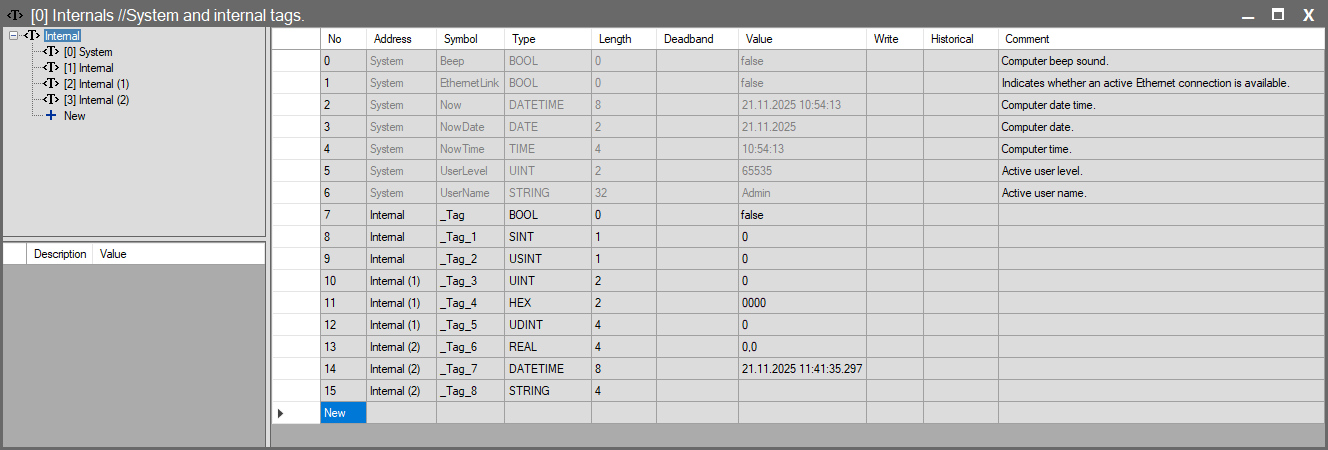
Tag Hierarchy and Grouping
Wise SCADA provides a default protocol structure to manage internal variables. Listed as [0] Internal in the project tree on the left (the name can be changed), this structure allows you to keep your tags organized.
1. System Tags
- The [0] System group is automatically created in every project.
- Contains fundamental system data such as date, time, and active user information.
- Tags in this group cannot be deleted or structurally modified by the user, and they are generally read-only.
- See: For more information about system tags, refer to the System Tags section.
2. User-Defined Tag Groups
- You can create your own internal tag groups according to your project needs.
- You can add new groups (e.g., [1] Internal, [2] Internal (1)) by clicking the New option in the tree view.
- You can change the Symbol (Name) and Comment properties of the groups from the properties panel on the bottom left.
3. Unified Tag View
- When you click the top [0] Internal heading in the tree structure, all internal tags under the hierarchy (both System and user-defined groups) are displayed as a single list in the panel on the right.
Detailed Configuration Guides
Review the sub-pages below for detailed information on how Internal tags are managed by the system, their behavior over the network, and their mathematical capabilities:
Explains how Internal tags are synchronized in distributed structures (over the Network) and the logic of data sharing between the server and client.
Data Persistence and Recording
Explains the differences between how tag values are preserved when the program is restarted (Retentive) and historical database logging (Historical).
Techniques for performing mathematical operations and bit manipulation without writing scripts by using extensions like .BIT, .SCALE, and .DIV on tags.