
Symbol
Symbol (Symbol Object)
The Symbol object provides access to Wise SCADA’s extensive vector graphics library. It is used to insert pre-made industrial drawings—such as motors, valves, pipes, tanks, and icons—into your project.
Because these objects are vector-based (SVG), their image quality remains pristine without pixelation, regardless of how much they are scaled up or down.
How to Add?
- Drag and drop the Symbol object onto the workspace.
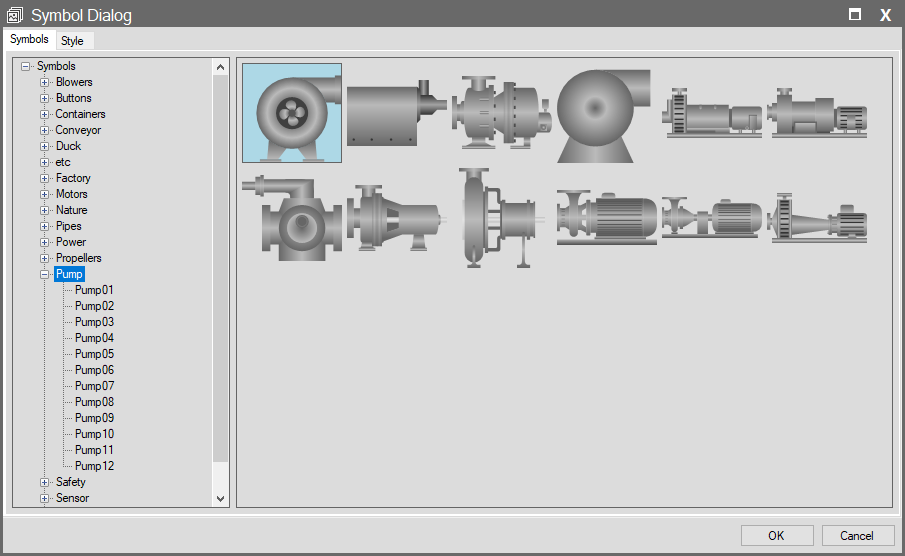
- The Symbol Dialog (Symbol Library) window will open automatically the moment you drop the object.
- Select your desired category and symbol from this window, then click the OK button to add it to the screen.
Detailed Information: Please visit the Symbol Dialog Window page for categories, search features, and detailed usage tips regarding the symbol library.
Properties Panel – Key Properties
This panel determines how the symbol behaves at Runtime.
Events
- Mouse Down / Mouse Up
- Allows you to use symbols as if they were interactive buttons.
Visible
- Binds the visibility of the symbol to a condition.
Enable
- Controls whether the symbol is clickable. When in a Passive (Disabled) state, Mouse Down events do not function.
Advanced Panel – Key Properties
This panel is used to modify or fine-tune the symbol after it has been added to the screen.
Symbol (Changing the Symbol)
- Wizard
- This is the most important feature. Clicking the button next to it reopens the Symbol Dialog window.
- Usage
- If you wish to replace an added symbol (e.g., a Green Motor) with another (e.g., a Red Motor), you do not need to delete and re-add it. Simply select the new symbol via the Wizard; the existing size and position settings are preserved.
Tip: Symbol vs. Image (PictureBox)
- Symbol: These are vector drawings internal to the Wise SCADA library. They scale without quality loss, have small file sizes, and are fully compatible with the system.
- PictureBox: These are external images (.jpg, .png) you upload. They may appear pixelated or blurry if resized significantly.
Recommendation: It is always recommended to use the Symbol object for industrial drawings.