
Sending Notifications to Telegram Groups/Channels
Sending Notifications to Telegram Groups/Channels
You can create a Telegram group or channel to share SCADA notifications within a team or gather them in a central location, rather than receiving them on a single account. This ensures all team members are instantly informed of important alarms and status changes.
Follow the steps below to add your bot to a group or channel:
1. Create a Group or Channel
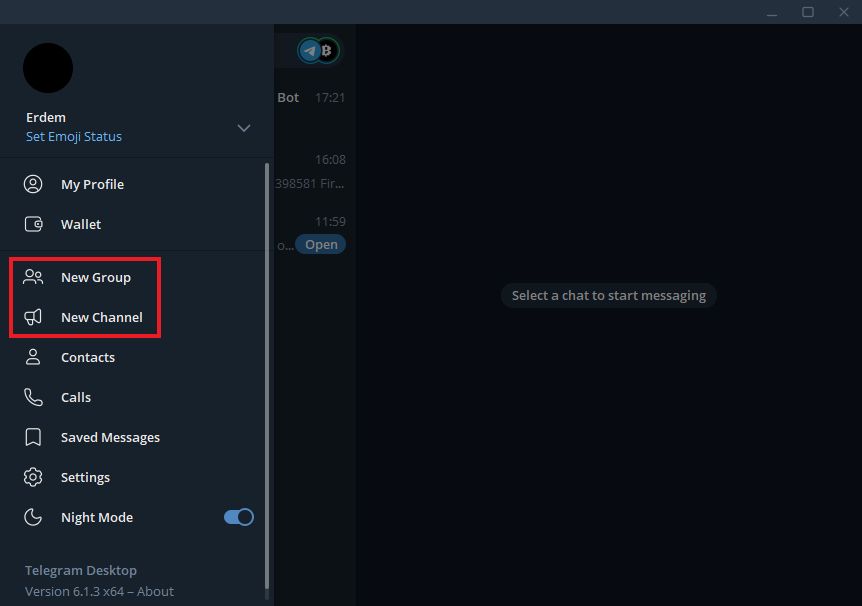
Open the Telegram menu and click on “New Group” or “New Channel”.
2. Define Name and Settings
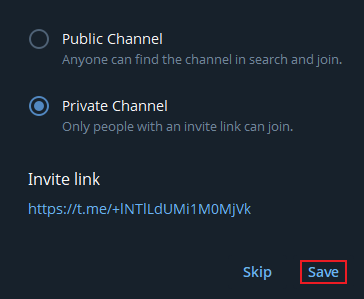
Enter a name for your group or channel (e.g., “SCADA Notifications”). If creating a channel, determine the privacy settings (Public or Private).

3. Add Your Bot to the Group/Channel
- In the creation screen (or “Add Members” section), type your bot’s username into the search bar (e.g., @WiseScada_Bot). Select your bot from the list and add it to the group or channel.
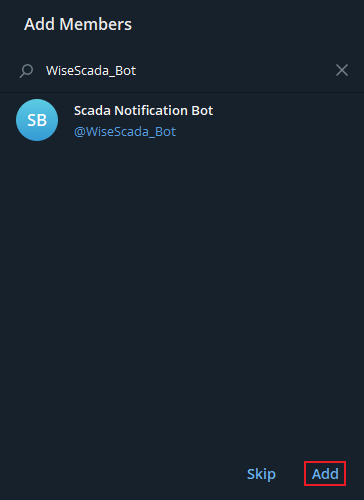
- Important: Remember that your bot must be a member of the group/channel to receive notifications.
- Note for Channels: Bots can only be added to channels as Admins. Therefore, confirm the authorization messages that appear on the screen.
Finding the Group/Channel Chat ID
After completing these steps, you need to obtain the Chat ID of the group or channel to complete the notification settings.
1. Send a Test Message
Send any test message to the group or channel. This message is required to make the ID visible via the API.
2. Open API Address in Browser
Open your web browser and enter the following address, replacing it with your own Bot Token:
https://api.telegram.org/bot<BOT_TOKEN>/getUpdates
3. Find the Chat ID
You will see data in JSON format on the page that opens. Look for the chat object within this data. The id field inside this object is the group or channel ID you are looking for.
JSON
{
  "ok": true,
  "result": [
    {
      "update_id": 123456789,
      "message": {
        "message_id": 123,
        "from": { ... },
        "chat": {
          "id": -1001234567890,
          "title": "Test Channel",
          "type": "channel"
        },
        "date": 1678912345,
        "text": "Bu bir test mesajıdır."
      }
    }
  ]
}- In the example above, the number -1001234567890 is the Chat ID you are looking for. Enter this ID into the notification settings section of your SCADA program to start sending notifications to your group or channel.