
Licensing Procedures
Licensing Procedures
The Wise SCADA development environment is completely free of charge. However, you must purchase a license to run your project in the Runtime environment. Licensing operations are performed through the Setup menu.
Accessing the License Menu
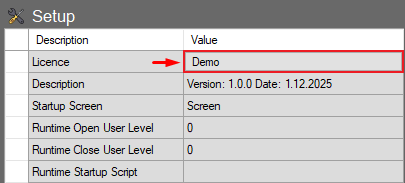
By default, Wise SCADA operates in “Demo” mode. To open the licensing window:
- Navigate to the Setup menu located in the properties tree on the left side.
- Click on the button labeled “Demo” in the Licence row.

In the license window that opens, follow the steps below according to your specific license type (Softkey or Hardkey).