
Creating a Bot
Creating a Bot on Telegram
To create your Telegram bot, you must use Telegram’s own tool, BotFather. BotFather is an official Telegram bot.
1. Find and Start BotFather
- Open the Telegram app.
- Type @BotFather in the search bar and find the official BotFather account. Check for the blue checkmark in the profile picture to ensure it’s the official one.
- Open the chat and click the Start button.
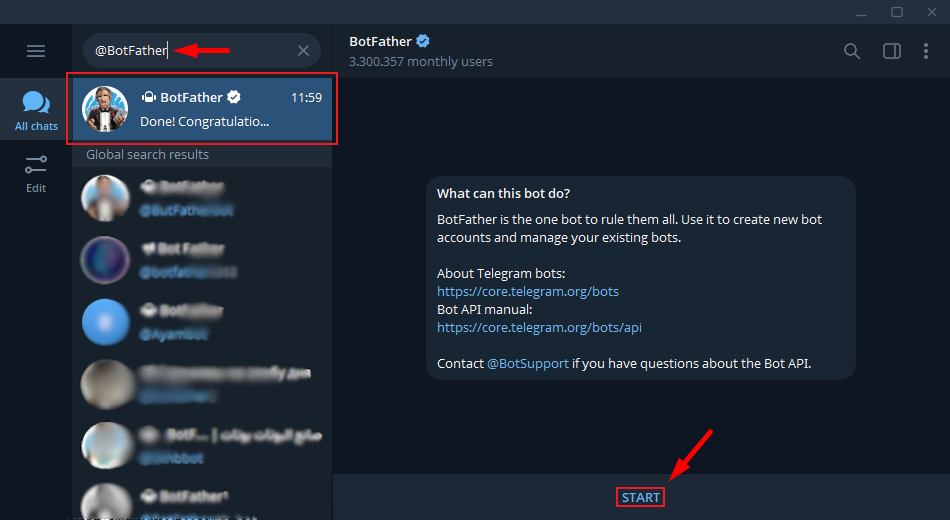
2. Create a New Bot
- Send the command /newbot in the BotFather chat.
- BotFather will ask for a name for your bot. This is the display name that will appear in the chat list. Type and send any name you like (e.g., “Scada Notification Bot”).
- Next, you will be asked to define a username for your bot. This username must be unique and must end with the word “bot” or “_bot” (e.g., “WiseScada_Bot”). “WiseScada_Bot”)
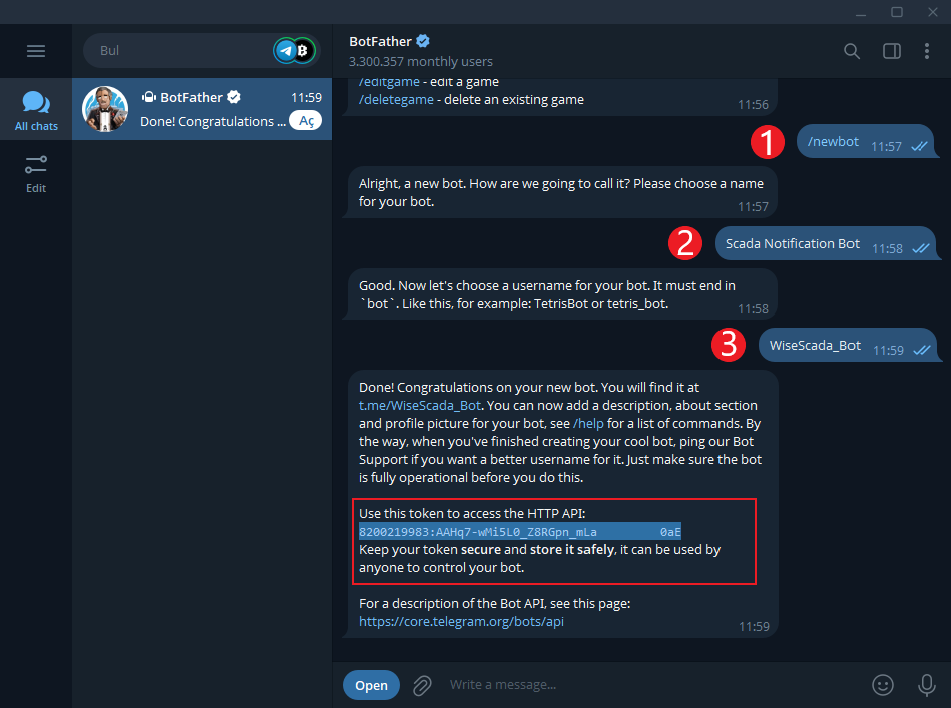
3. Get the API Token
- After defining the username, BotFather will send a message confirming that your bot has been successfully created.
- This message contains your API Token. This token is the most critical piece of information required to connect your bot to your SCADA program.
- Your token will look something like this: 123456789:A_B_C_D_E_F_G_H_I_J_K_L_M_N_O_P_Q_R.
- Security Warning: Do not share this token with anyone. If compromised, you can revoke and regenerate the token via BotFather.
4. Start Chat with Your Bot and Get Your User ID
- Search for the name of the bot you created and open the chat. Click the Start button.

- Your bot needs your Telegram account ID to send you notifications.
- There are different ways to find your User ID. The simplest way is to use another bot called @userinfobot.
- Find @userinfobot on Telegram and press Start. The bot will automatically send you your own ID.
Note: Write down this ID. You will enter this ID into the Chat ID window when you press the Send button to test in the Notification section.

