
SMS
SMS Notifications
Use SMS notifications to stay informed about critical events even when internet connectivity is unavailable or unreliable. This feature sends text messages to specified phone numbers directly through cellular networks.
Prerequisite: To enable SMS notifications, you must first subscribe to an SMS service provider and obtain an API key. This key ensures your system securely connects to the SMS sending service.
To utilize SMS notifications in your SCADA system, you first need to create a script capable of integrating with an SMS provider. Follow the steps below to complete your notification settings.
Creating a Script
- Go to the Script column in the notification settings table.
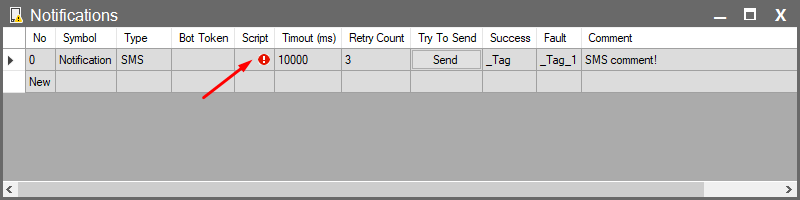
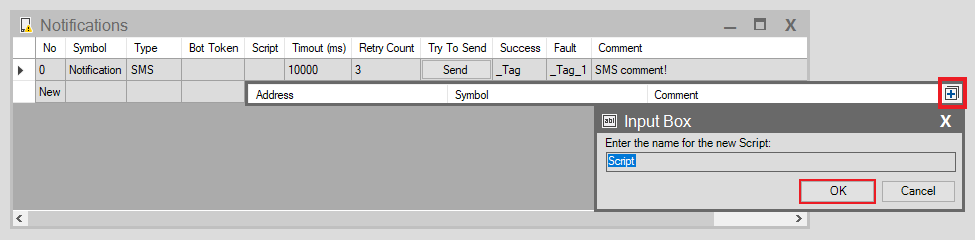
- Click the + button in the top right corner of the window that opens to create a new script.
- Enter a name for your script in the dialog box and confirm by clicking OK.
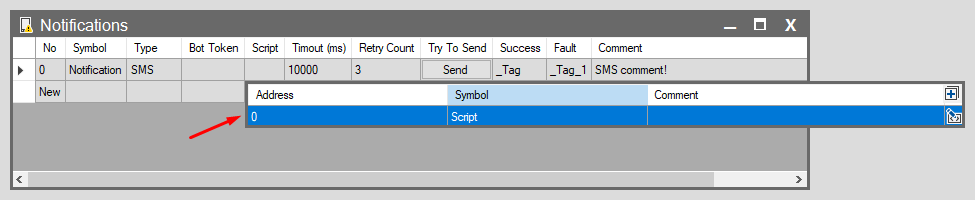
- The system will automatically generate your script with a pre-prepared code template designed for sending SMS.
Editing and Compiling the Script
To make the created script usable, you must edit its content and compile it.
- Add the API information (API URL, API Key, etc.) received from your SMS provider into the script.
- Refer to: See the SMS Script Configuration page for details on how to enter this information.
Selecting the Script
- After editing and compiling the script content, go back to the Notifications table and select the script you just created from the Script column.
Testing the Sending
- After entering all necessary parameters, click the Try To Send button to test the SMS transmission and ensure your settings are working correctly.