
Notifications
Notifications
You can manage notification settings for important system events here. You can receive instant alerts via SMS or Telegram and determine the conditions under which notifications are sent. This ensures you stay informed about critical developments in a timely manner.
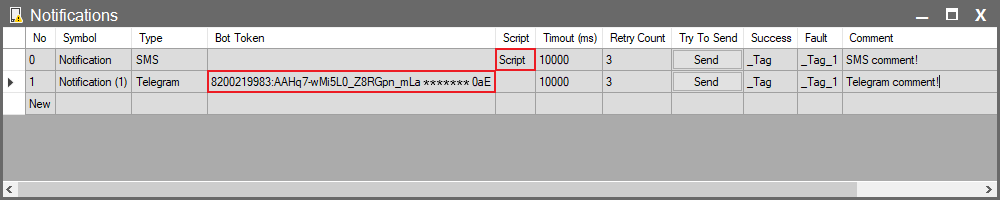
Notification Settings
| Parameter | Description |
| No | The sequence number of the row in the table. |
| Symbol | A unique name you assign to identify your notification. |
| Type | Specifies the type of notification to send (SMS, Telegram). |
| Bot Token | The unique identity key for your bot, used for Telegram notifications. This allows the system to communicate with your bot via the Telegram API. |
| Script | Select the script containing the necessary configuration to send SMS notifications. Tip: When you click the cell, you can create a new script by pressing the + button in the pop-up window. The script created this way includes a ready-made template for sending SMS. To make the script work, you must enter the information provided by your SMS provider into this script. |
| Timeout (ms) | The maximum time (in milliseconds) the system will wait for the notification sending process. If this time is exceeded, the operation is considered failed. |
| Retry Count | Determines how many times the system will retry if sending the notification fails. |
| Try To Send | Click this button to send a manual test message to verify your notification settings. |
| Success | Select the tag that will be updated when the notification is sent successfully. |
| Fault | Select the tag that will be updated if sending the notification fails. |
| Comment | An area where you can enter additional notes or descriptions regarding the notification. |