
Soft PLC Tag Synchronization
Soft PLC Tag Synchronization
One of the most important features of the Soft PLC module is its ability to establish a direct bridge between SCADA tags and the virtual PLC’s internal memory (I, Q, M, DB). This process is performed via the Tag Synchronization Dialog window.
This dialog allows you to bind a tag in your SCADA project (e.g., Scada_Tag_4) to a specific memory address in your virtual PLC (e.g., Plc_Tag_4 / MB 1).
Column Descriptions
| Parameter | Description |
| Tag | The name of the tag defined in your SCADA project. |
| PLC Tag | The symbolic name to be used within the PLC program. |
| PLC Address | The physical equivalent of the tag in PLC memory (Input (I), Output (Q), Marker (M), or DataBlock (DB)). |
| PLC Type | Data type (BOOL, USINT, REAL, etc.). |
| PLC Comment | Description for the synchronization. |
Once this connection is established, when the value of Scada_Tag_4 in SCADA changes, the MB 1 memory area inside the PLC is updated instantly. Similarly, if the PLC logic changes the value of MB 1, the Scada_Tag_4 tag adopts this new value.
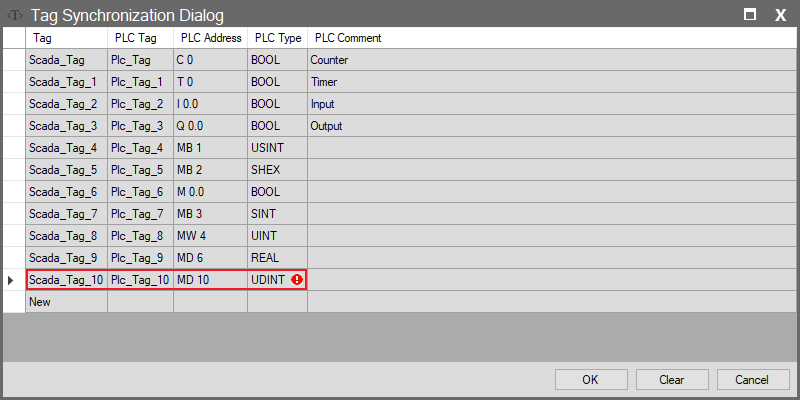
Data Type Mismatch and Error Status
The system enforces data type compatibility between the SCADA tag and the PLC memory address.
- Error Indicator: As seen in the image, there is a red exclamation mark (!) at the end of the Scada_Tag_10 row.
- Meaning: This error means that the data type of the SCADA tag (e.g., UDINT) is incompatible with the data type of the mapped PLC memory address (MD 10).
- Result: As long as this red exclamation mark exists on any row in the window, changes will not be saved, even if you press the “OK” button. To successfully synchronize, this error must be corrected first (by selecting the appropriate data type or address).
Clearing Settings
If you wish to remove a synchronization, you can select the relevant rows in the Tag Synchronization Dialog window and delete them, or use the Clear button to wipe the entire synchronization list.