
Testing Telegram Notifications
Testing Telegram Notifications
After creating your Telegram bot and obtaining the necessary information (Bot Token and Chat ID), it is important to perform a test to ensure the notification system is working correctly. This test verifies that all settings are complete and your system can successfully connect to Telegram.
You can test your bot by following the steps below:
1. Enter Bot Token and Chat ID
- Enter the API Token you received from BotFather into the Bot Token column in the Notifications table.

- Click on the Send column.
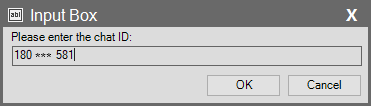
- In the pop-up window, enter your Chat ID (obtained from @userinfobot or for the group/channel) and press OK.
- This action triggers the system to send a test message via your Telegram bot.
2. Check for Success Message
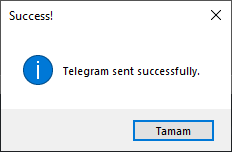
- If everything is configured correctly, you will see the message “Success! Telegram sent successfully.” on the screen. This confirms that the connection has been established successfully.
3. Check Telegram
- Finally, open your Telegram app and go to your bot’s chat. You should see that the test message from SCADA (“This is a test message.”) has been successfully delivered by your bot.
- These steps help you verify that your system is running smoothly, and you are now ready to receive notifications for important events.
