
Tags
Tags
Tags are the fundamental data units of your SCADA system. All critical information—such as sensor data read from PLCs, internal system variables (user info, time, etc.), and recipe parameters—is managed through tags. Reporting, visualization, and automation processes are entirely fed by this data pool.
Tags Menu and Protocol Structure
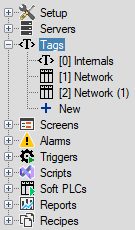
The Tags section in the project tree on the left is the main area where you manage all data points and connection protocols. All data sources in your project are displayed in a hierarchical tree structure under the “Tags” heading. Every newly added protocol (Network) is added to the list with a default name (e.g., Network, Network (1)). Recommendation: To prevent confusion, change these names to match your specific device or process (e.g., Packing_Line).
Adding a New Protocol (Driver)
To read data from a field device, you must first add that device’s communication protocol (Driver) to your project.
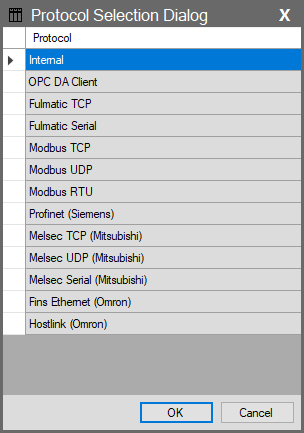
Step-by-Step Guide:
Use the New option under the Tags main heading in the Project Tree on the left to define a new protocol.
The “Protocol Selection Dialog” window will appear.
Select the protocol supported by the device you want to connect to from the list (e.g., Modbus TCP, Profinet, OPC DA Client).
When you click OK, the selected driver will be added to the tree structure as a new “Network”.
Tip: If you do not have a physical device and only want to perform internal system calculations, you can use the Internal option from the list.
Tags List Parameters
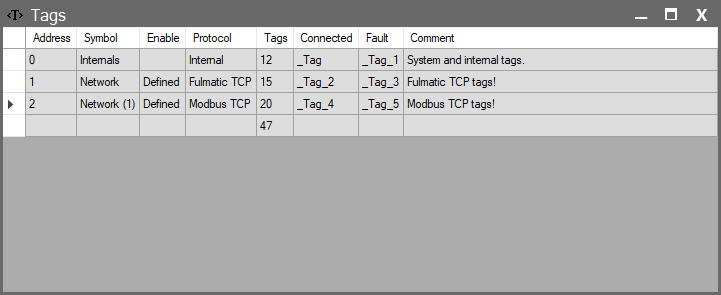
When the Tags heading is selected in the project tree on the left, the right panel lists all communication protocols (Networks) added to your project. This list summarizes all connection points between your system and the outside world (PLCs, devices) as well as its internal structure (Internal). Each row represents an independent driver and is managed via the following parameters:
| Parameter | Description |
| Address | The unique address ID of the protocol within the system. Assigned automatically. |
| Symbol | The name of the protocol as it appears in the project tree and lists (e.g., Internal, Network, PLC_Line_1). |
| Enable | A Bool tag that controls whether the protocol (Driver) is active. By binding a tag here, you can dynamically turn communication on or off. |
| Protocol | Specifies the type of communication driver used (e.g., Fulmatic TCP, Modbus RTU, Profinet). |
| Tags | Shows the total number of tags defined under this protocol (driver). |
| Connected | Status information showing whether the connection to the device is successful. |
| Fault | Shows if there is a connection error. |
| Comment | An explanatory note entered by the user regarding the protocol. |