
Database Connection Issues
Database Connection Issues
If the database is inaccessible during the startup of Wise SCADA, a warning dialog will appear. This mechanism is designed to maintain system continuity and prevent the software from hung states during potential delays.
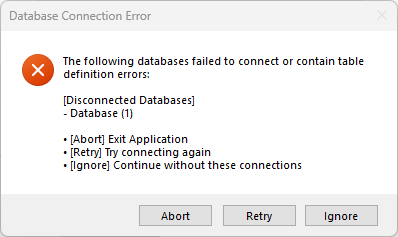
Error Dialog and Options
When the error dialog shown in the image appears, you can take three different actions:
- Abort: Completely cancels the startup process and closes the application.
- Retry: Manually re-queries the connection. If the database has become ready, the system opens normally.
- Ignore: Continues to the system without the current database connection. (Note: Data logging is not possible in this mode).
Why Are You Seeing This Message?
This panel typically appears in two main scenarios:
- Network and Server Delays: If your database is located on another computer (Remote DB), an instantaneous network disconnection or the server computer not being fully booted yet will trigger this error.
- Windows Startup Delay: SQL Server services initialize shortly after Windows boots. If Wise SCADA starts before the SQL service is fully operational, this waiting message will be displayed.
Smart Standby and Automated Decision Making
The system features a mechanism to make its own decisions when an operator is not present:
- The 1-Minute Rule: If no action is taken on the error message for 1 minute, the system automatically executes the “Ignore” command. This prevents the software from getting stuck on an error screen—especially in remote monitoring systems—and ensures that the Runtime initializes.
Redundant Systems
In redundant systems, if a connection loss occurs, the following prompt appears: “Do you want to continue without database connections?” To ensure the Runtime is not interrupted, the system automatically responds with “Yes” after 1 minute. This allows live monitoring and control processes to continue even if data logging is temporarily disrupted.
Important Reminders
- Delayed Start: If your SQL Server service is set to “Automatic (Delayed Start)”, it is normal to see this message. The system will wait until the service is ready.
- Connection vs. Project Errors: These automated transitions apply only to connection-related issues. If the error originates from a corrupted database table structure or other project-specific configuration errors, the system will wait for manual intervention for safety and will not perform an automated transition.