
Prevent Running Multiple Runtime Instances
Note: The content of this page is for Screens only and does not apply to Pages.
This article explains how to prevent operators from accidentally starting multiple Wise SCADA Runtime instances.
By default, Wise SCADA allows multiple Runtime instances to run on the same computer. This makes it possible to run multiple projects simultaneously.
If the computer is intended to run only a single SCADA project and you want to prevent operators from launching additional Runtime instances, you can use the following startup script.
Step 1 – Create a Startup Script
Create a new C# script named Single Runtime and paste the following code:
using System;
using System.IO;
using System.Collections;
using System.ComponentModel;
using System.Windows.Forms;
using Microsoft.CSharp;
using System.Diagnostics;

public class MainClass
{
    public void Main()
    {
        Process[] p = Process.GetProcessesByName("Wise SCADA Runtime");
        if (p.Length > 1)
        {
            MessageBox.Show("Wise SCADA Runtime is already running.");
            Process.GetCurrentProcess().Kill();
        }
    }
}
Step 2 – Assign the Startup Script
Open Setup and assign the Single Runtime script to the Runtime Startup Script property.
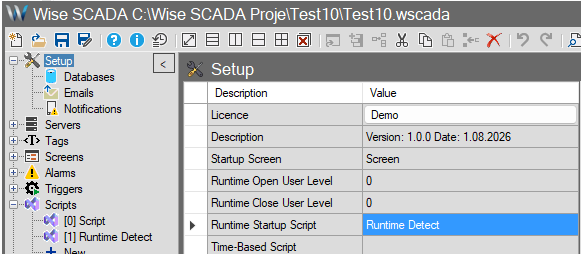
The script is executed automatically whenever Runtime starts. If another Runtime instance is already running, a warning message is displayed and the new Runtime process is terminated immediately.
Why is Process.Kill() used?
The purpose of this script is to stop the second Runtime instance before it begins normal operation.
Process.Kill() is used intentionally instead of Application.Exit() so that no Runtime shutdown scripts or application exit logic are executed. Since another Runtime instance is already running, the second instance should terminate immediately without performing any shutdown operations.
Note
Use this script only if your application is designed to allow a single Runtime instance. If you intentionally run multiple Wise SCADA projects on the same computer, do not use this script.