
HTTPS
HTTPS
Wise SCADA ensures the encryption of communication by using TLS for HTTPS, WebSocket Secure, and Wise SCADA Secure connections. To use these connections, an appropriate certificate must be generated on the server computer, and it must be ensured that client computers recognize this certificate as trusted.
The certificate generation and installation procedures described on this page apply to all three protocols. The server IP address or hostname used in the connection must match one of the addresses defined in the certificate.
HTTPS Certificate Management
HTTPS Certificate Management is used to generate and update the server certificate that will be used for secure connections. To access this window, go to the Setup section and click the Open button in the HTTPS Certificate Management row.
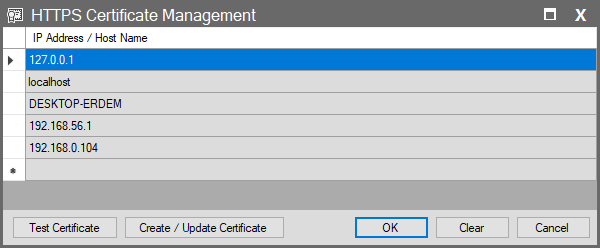
- Enter only the IP address or hostname; do not add protocol prefixes such as https:// and port numbers to this list.
- Important: If the same server will be accessed using different addresses, each address to be used must be added to the certificate list.
Test Certificate
Checks the usability of the current certificate for HTTPS connections.
Create / Update Certificate
Generates a certificate based on the IP addresses and hostnames defined in the list, or updates the existing certificate. If the address to be used for the connection changes, add the new address to the list and update the certificate.
Clear
Clears the IP address and hostname list.
Certificate Generation
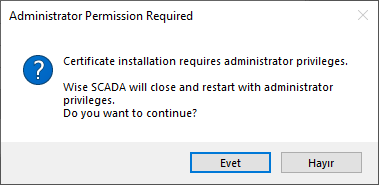
After the IP addresses and hostnames are defined, the certificate is generated using the Create / Update Certificate button. Generating a certificate and installing it on the system requires administrator privileges. If necessary, Wise SCADA will request the application to be restarted with administrator privileges.
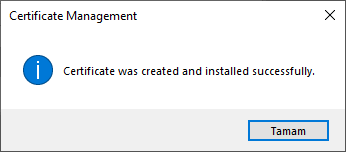
When the operation is completed successfully, the following message is displayed:
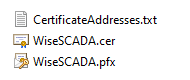
When the certificate is created, a Certificate folder is created inside the project folder.
| File | Description |
| CertificateAddresses.txt | Contains the IP addresses and hostnames used when generating the certificate. |
| WiseSCADA.cer | Used to establish trust in the server certificate by installing it on client computers. It does not contain the private key. |
| WiseSCADA.pfx | Contains the certificate to be used by the server and the private key information. |
Important: Do not distribute the WiseSCADA.pfx file to client computers. Use only the WiseSCADA.cer file for client installation.
Moving the project folder to another location on the same computer does not change the addresses defined in the certificate. However, if the server IP address or hostname used in the connection changes, the certificate must also be updated.
Certificate Installation on a Client Computer
To securely access the HTTPS connection from another computer, the WiseSCADA.cer file must be installed on the computer that will act as the client.
The installation is done via Windows:
- Double-click the WiseSCADA.cer file.
- Click on the Install Certificate option.
- Select the Local Machine option.
- Confirm the administrator prompt.
- Select the Place all certificates in the following store option.
- Click the Browse button.
- Select the Trusted Root Certification Authorities store.
- Complete the installation by following the Next and Finish steps.
- Close and reopen all Chrome or Edge windows.
Once the installation is complete, the client computer recognizes the generated certificate as trusted, and the HTTPS connection can be used securely.
For example:
If you are going to connect to the address https://192.168.0.104, the address 192.168.0.104 must have been defined when the certificate was generated.
Difference Between Server and Client
The computer where the certificate is generated and the HTTPS service is running can be considered the Server, while the computer accessing the SCADA over HTTPS can be considered the Client.
On the Server computer, the certificate is generated via HTTPS Certificate Management. On the Client computer, the WiseSCADA.cer file generated by the server is installed in the Trusted Root Certification Authorities store.
Therefore, if HTTPS connections will be made from different computers, certificate installation may be required separately for each client computer.
Difference Between HTTP and HTTPS
In HTTP communication, data between the client and SCADA is transferred over a standard HTTP connection.
When using HTTPS, the connection is protected by TLS.
| Feature | HTTP | HTTPS |
| Connection | Unencrypted | Encrypted |
| Default Port | 80 | 443 |
| URL | http:// | https:// |
| Certificate | Not Required | Required |
It is highly recommended to use HTTPS, especially if the SCADA system will be accessed from outside the local network or if sensitive data such as user login information is being transferred.