
DNP3 Master
DNP3 Master
The DNP3 Master driver is used to communicate via TCP/IP with RTUs, PLCs, or Intelligent Electronic Devices (IEDs) such as Protection Relays that support the DNP3 (Distributed Network Protocol).
These settings determine how the SCADA (Master) exchanges data with the field device (Outstation). This protocol is widely utilized in the Power/Energy and Water Automation sectors.
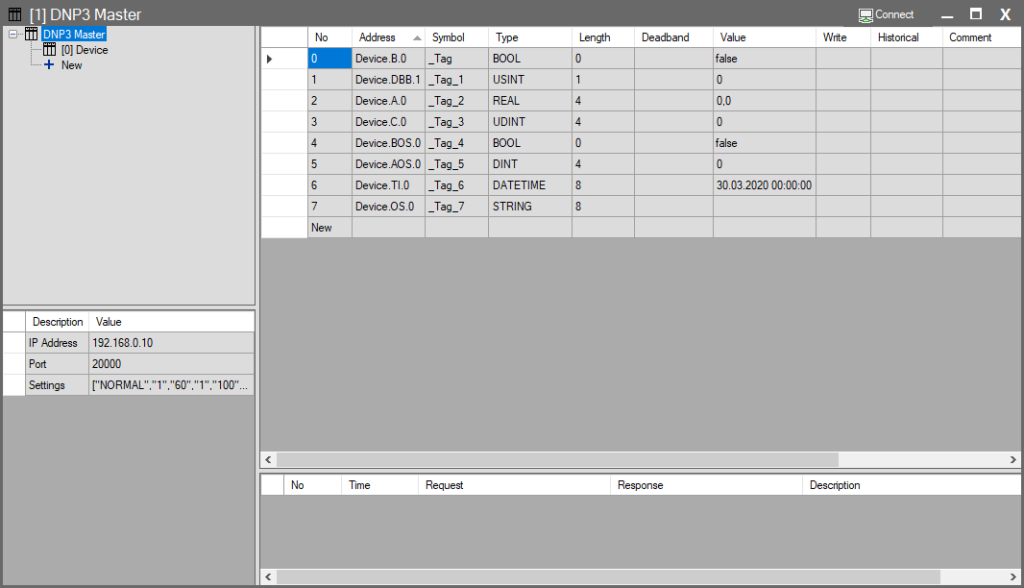
Connection Parameters
| Parameter | Description | Example Value |
| IP Address | The IP address of the remote device (RTU/PLC) to communicate with. | 192.168.0.10 |
| Port | The standard TCP port for DNP3 is 20000. | 20000 |
| Settings | A data string containing protocol-specific advanced settings. Clicking this field opens the “DNP3 Master Dialog” for detailed configuration. | [“NORMAL”,”1″,”60″,…] |
DNP3 Master Dialog Settings
This window contains settings for timing, retries, and data class management for the DNP3 protocol.
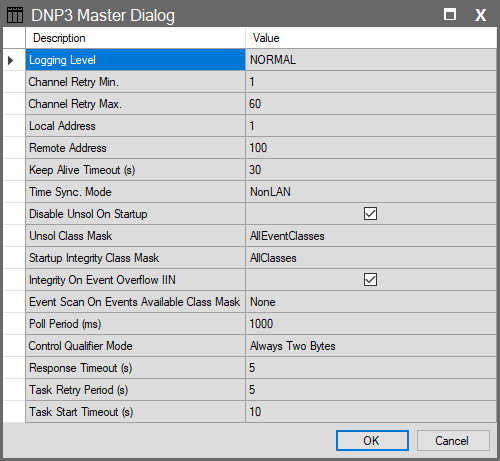
| Parameter | Description | Options / Default |
| Logging Level | Determines the detail level of background logs. “NORMAL” is recommended unless troubleshooting. | NORMAL (Default), ALL, APP_COMMS, NONE |
| Channel Retry Min. | Minimum wait time (seconds) before attempting to reconnect after a link failure. | 1 |
| Channel Retry Max. | Maximum limit for the reconnection wait time (seconds). The system increases the wait time exponentially between failed attempts up to this limit. | 60 |
| Local Address | Master ID: The address of the SCADA system within the DNP3 network. | 1 |
| Remote Address | Outstation ID: The DNP3 address of the target RTU or PLC. | 100 |
| Keep Alive Timeout (s) | Frequency of TCP-level “Keep Alive” packets sent to verify link integrity. | 30 |
| Time Sync. Mode | The method the Master (SCADA) uses to synchronize the Slave device’s clock. | NonLAN: Standard (for high-latency networks). LAN: Precision (for local networks). None: No sync. |
| Disable Unsol On Startup | If checked, automatically disables the device’s ability to send unsolicited messages when the connection is first established. | Checked (Enabled) |
| Unsol Class Mask | Defines which data classes are permitted to send “Unsolicited” messages. | AllClasses: Immediate updates for Class 1, 2, 3. AllEventClasses: Event data only. None: Polling only. |
| Startup Integrity Class Mask | Defines which classes the Master reads completely (Integrity Poll) upon initial connection. | AllClasses (Rec.): Full sync (Class 0,1,2,3). AllEventClasses: Event classes only. |
| Integrity On Event Overflow | Determines if SCADA initiates an “Integrity Poll” when the device’s event buffer is full. Critical for preventing data loss. | Checked (Enabled) |
| Event Scan On Events Available | Defines which classes to read when the device raises the “Events Available” flag. | None (Common): Used if Unsolicited is ON. AllEventClasses: Scans Classes 1, 2, 3. |
| Poll Period (ms) | General Poll: The frequency at which SCADA periodically reads data from the device (Class 0 Poll). | 1000 ms |
| Control Qualifier Mode | Defines the index size used when sending commands (Write). Legacy devices may require 1-byte indexes. | Always Two Bytes: Standard/Secure. Allow One Byte: For legacy devices. |
| Response Timeout (s) | Maximum time to wait for a response from the device after a request is sent. | 5 |
| Task Retry Period (s) | Wait time before retrying a timed-out or failed task. | 5 |
| Task Start Timeout (s) | Maximum time a task can wait in the queue before starting. | 10 |
Addressing Format and Data Types
When creating tags in Wise SCADA, the following abbreviations are used for DNP3 data groups:
| Group No | Data Type Definition | Wise SCADA Tag | Usage Purpose |
| 1 / 2 | Binary Input | B | Digital inputs (Open/Closed) |
| 3 | Double-bit Input | DBB | Two-bit states (Trip/Close/Fault) |
| 30 | Analog Input | A | Measurements (Temp, Pressure, etc.) |
| 20 | Counter | C | Counter data (Energy Pulse, etc.) |
| 10 | Binary Output Status | BOS | Feedback for digital outputs |
| 40 | Analog Output Status | AOS | Feedback for setpoints |
| 50 | Time & Interval | TI | Time synchronization and interval data |
| 110 | Octet String | OS | Text-based data |